How to Record Patient Medical History & Safety Section in AfyaWingu (Allergies, Medications, Past Medical History Guide)
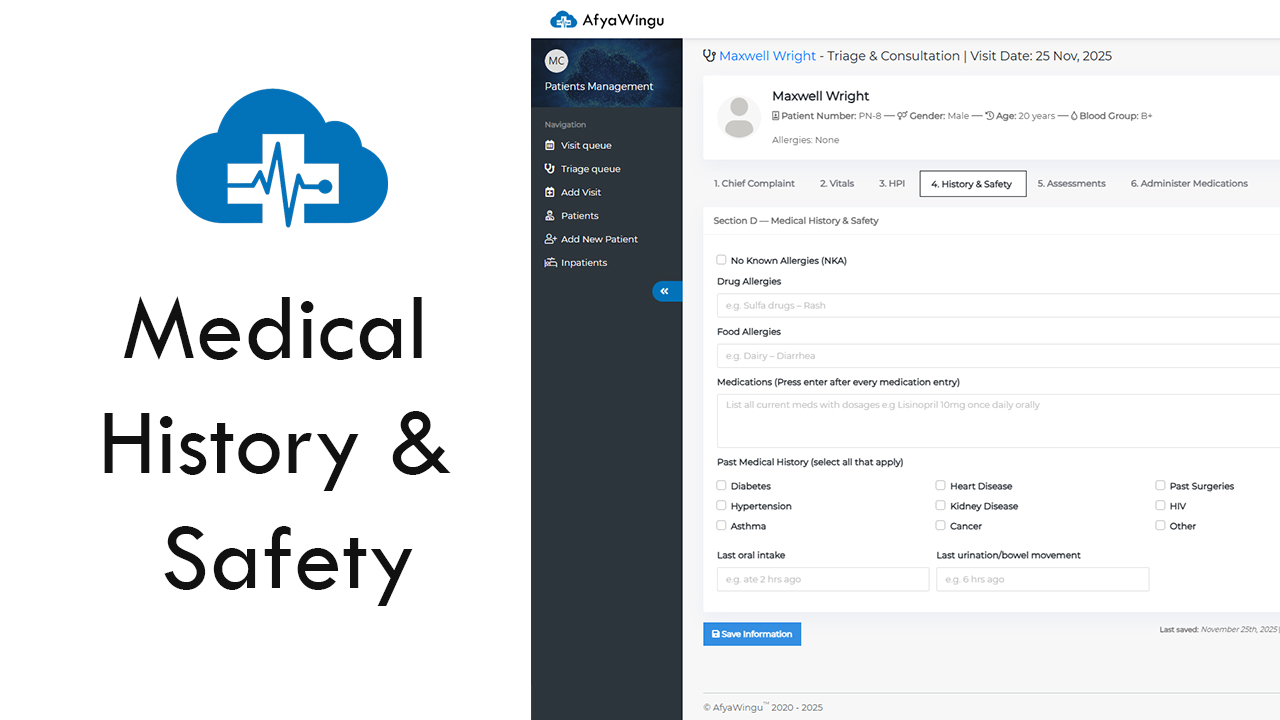
How to Complete Section 4: History & Safety in AfyaWingu Patient Management
Welcome back to AfyaWingu Patient Management. In this guide, we walk you through Section 4: History & Safety — where clinicians enter the patient’s complete medical background, including allergies, medications, long-term conditions, and essential safety details.
We continue using the patient record for Maxwell Wright, age 20, male, with a visit date of November 25, 2025. You’ve already completed his Chief Complaint, Vital Signs, and HPI. Now it’s time to build a complete clinical profile to support accurate diagnosis and safe treatment.
At the top of the screen, the tab “4. History & Safety” is highlighted in blue.
Let’s go through each part clearly and thoroughly.
🔹 Section D — Medical History & Safety
This section helps you identify risk factors, allergies, medications, and other safety considerations that may affect treatment or diagnosis.
1. No Known Allergies (NKA)
The NKA checkbox is selected by default, meaning the patient is assumed to have no allergies unless stated otherwise.
If the patient DOES have allergies:
🔄 Uncheck the box, then continue to the drug and food allergy fields.
Example when NOT NKA
- Drug Allergies:
Penicillin – causes rash and swelling - Food Allergies:
Peanuts – causes throat tightness and difficulty breathing
💡 Tip: Always ask the patient directly:
“Are you allergic to any medicines, foods, or materials?”
Never assume.
2. Drug Allergies
If the patient has drug allergies, record them along with the reaction.
Example entries:
- Sulfa drugs – Rash
- Ibuprofen – Stomach pain and nausea
- Codeine – Dizziness and vomiting
Format tip:
- Drug name
- Type of reaction (e.g., rash, swelling, vomiting)
💡 Tip: Click “Add” after each entry to keep the list clean and organized.
3. Food Allergies
Record food allergies and their reactions clearly.
Example entries:
- Dairy – Diarrhea and bloating
- Eggs – Hives and itching
- Shellfish – Swelling of lips and tongue
Format tip:
Include:
- Food item
- Reaction (e.g., hives, diarrhea, anaphylaxis)
💡 Tip: Pay attention to common allergens — peanuts, tree nuts, seafood, soy, and milk — especially before surgery or IV treatment.
4. Medications (Press Enter after each entry)
List all current medications the patient is taking, with all important details.
Example entries:
- Lisinopril 10mg once daily orally
- Paracetamol 500mg every 6 hours as needed
- Metformin 500mg twice daily
Format tip:
- Drug name
- Dose (mg)
- Frequency (daily, twice daily, PRN)
- Route (oral, IV, topical)
💡 Tip: Press Enter after each medication to create clean, separate lines for readability.
5. Past Medical History (Select all that apply)
Check all conditions the patient has now or has had in the past.
Available conditions include:
- Diabetes
- Hypertension
- Asthma
- Heart Disease
- Kidney Disease
- Cancer
- Past Surgeries
- HIV
- Other
Examples:
- If Maxwell has asthma → check Asthma
- If he had an appendectomy → check Past Surgeries
Common combinations often seen in clinic:
- Diabetes + Kidney Disease
- Hypertension + Heart Disease
- Asthma + Allergies
💡 Tip: Don’t guess. Ask the patient or check previous records if unsure.
6. Last Oral Intake
Ask:
“When did you last eat or drink anything?”
Example entries:
- ate 2 hrs ago
- “Nothing since midnight”
- “Last meal: 8 AM”
- “Sipped water 1 hour ago”
💡 Why this matters:
Crucial before any procedure, sedation, surgery, or anesthesia — prevents aspiration.
7. Last Urination / Bowel Movement
Ask:
“When did you last urinate or have a bowel movement?”
Example entries:
- Last urination: 6 hrs ago
- Last bowel movement: Yesterday morning
Other examples:
- “Pee: 3 hours ago | BM: None for 2 days”
- “Pee: Just now | BM: This morning”
💡 Why this matters:
Helps assess hydration, kidney function, UTI risk, bowel obstruction, and overall gastrointestinal health.
🔹 Quick Overview Panel (Right Side)
The quick summary box displays:
- Allocated Doctor: Unknown
- Allocated Nurse: Unknown
- Visit Date: November 25, 2025
The “View Past Visit History” button is especially helpful when dealing with chronic or recurring conditions.
🔹 Live Interpretation Panel
Based on previously recorded vitals, Maxwell’s readings trigger:
- Fever
- Low SpO₂
These alerts help clinicians identify issues early and prioritize care.
🔹 Save Your Work
Click the blue “Save Information” button after entering each field, or after completing the full section.
You’ll see:
Last saved: November 25th, 2025 | Updated By: Malaika Center
This supports accountability, accuracy, and smooth clinician-to-clinician handover.
What’s Next?
After completing Section 4, continue to:
➡️ Section 5: Assessments — to record clinical impressions, diagnoses, and plans
➡️ Section 6: Administer Medications — to prescribe or administer treatment
Each step adds clarity to the patient’s health story, helping clinicians make faster and safer decisions.
Final Thoughts
Section 4: History & Safety is essential for patient safety and quality care.
AfyaWingu makes it easy to capture allergies, medications, and medical history using a clean, structured interface designed for real clinical workflows.