How to Record & Interpret Patient Vitals in AfyaWingu – Step-by-Step Guide
Welcome back to AfyaWingu Healthcare Management System—your digital partner in delivering efficient, accurate, and patient-centered care.
In today’s guide, we’re diving deep into Section 2: Vitals, a critical component of every patient encounter. Accurate vital signs don’t just fill a chart—they paint a real-time picture of a patient’s physiological status, guide urgent decisions, and can even save lives.
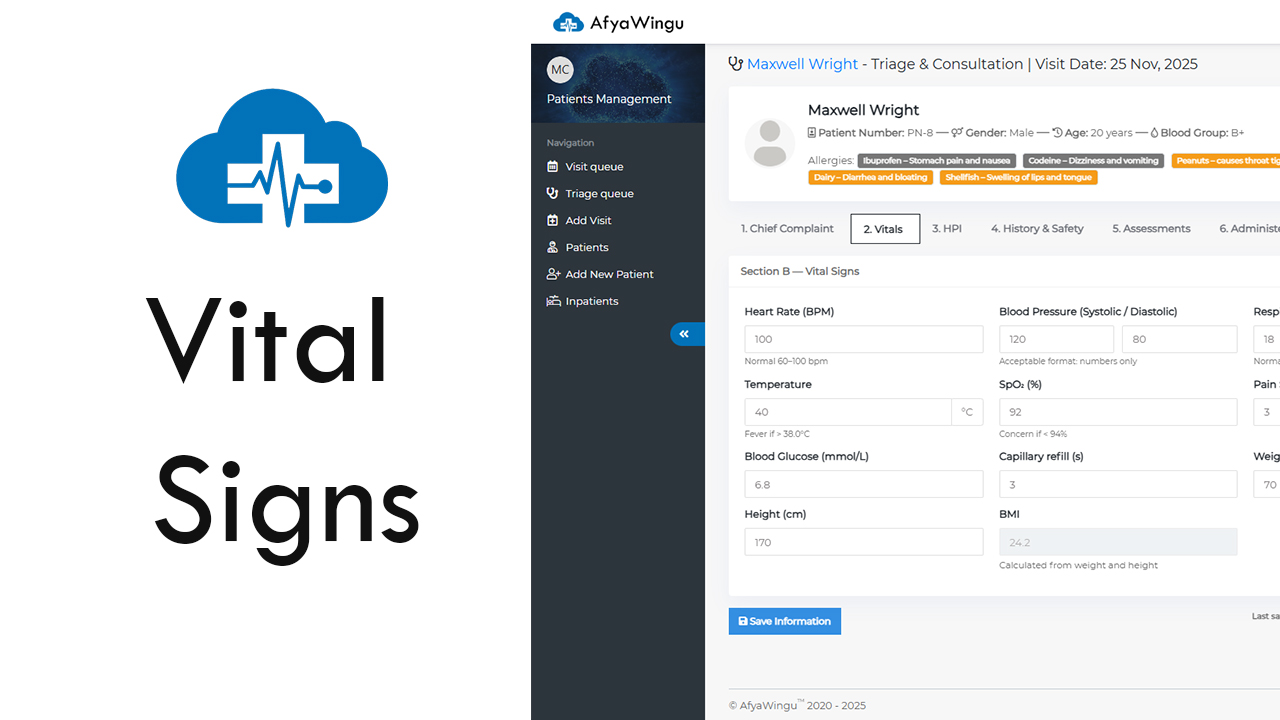
Let’s walk through this section using a live example: Maxwell Wright, a 20-year-old male visiting on November 25, 2025. We’ve just completed his Chief Complaint and are now ready to capture his vital signs. Notice the blue-highlighted tab at the top: “2. Vitals”—you’re in the right place.
🔹 Why Vitals Matter
Vital signs are the body’s early warning system. In AfyaWingu, **Section B: Vital Signs** includes **12 key fields**, each designed to give you—and your care team—actionable insights. Let’s break them down:
1. Heart Rate (BPM)
What to enter: Beats per minute (e.g., `100`)
Normal (adults): 60–100 BPM
Red flags:
High: Fever, anxiety, dehydration
Low: Shock, hypothermia, medication effects
💡 *Pro tip*: If the patient just walked in or seems anxious, wait 2 minutes before measuring for accuracy.
2. Blood Pressure (Systolic / Diastolic)
Enter separately: Systolic (e.g., `120`) and Diastolic (e.g., `80`)
Normal: <120/80 mmHg
Concerns:
High: Hypertension, pain, stress
Low: Shock, blood loss, dehydration
💡 System note: Enter numbers only—AfyaWingu auto-formats as “120/80”.
3. Respiratory Rate (breaths/min)
Normal: 12–20 breaths/minute
Abnormal:
Fast: Asthma, pneumonia, anxiety
Slow: Drug overdose, neurological issues
💡 Stealth method: Count breaths while pretending to check pulse—patients often alter breathing if they know they’re being watched!
4. Temperature (°C)
Normal: 36.5°C – 37.5°C
Fever: ≥38.0°C (infection, inflammation)
Hypothermia: <35°C (exposure, metabolic issues)
💡 Best practice: Note method (oral, axillary, tympanic)—though the system assumes °C.
5. SpO₂ (%) – Oxygen Saturation
Normal: 95%–100%
Alert: <94% may signal lung or heart issues
💡 Accuracy tip: Ensure the pulse oximeter is properly placed and the patient is still.
6. Pain Scale (0–10)
Ask: “On a scale from 0 (no pain) to 10 (worst imaginable), how would you rate your pain?”*
Interpretation:
-
- 0–3: Mild
- 4–6: Moderate
- 7–10: Severe
💡 *Documentation tip*: Always add location and quality (e.g., “8/10 sharp left abdominal pain”).
7. Blood Glucose (mmol/L)
Fasting normal: 3.9–5.5 mmol/L
High (>7.0): Uncontrolled diabetes
Low (<3.9): Hypoglycemia (watch for sweating, confusion)
💡 Clinical note: Record time of last meal for context.
8. Capillary Refill (seconds)
How to test: Press fingernail or sternum; time color return
Normal: ≤2 seconds
Delayed (>2 sec): Poor perfusion, dehydration, shock
💡 Avoid error: Perform in a warm room—cold causes false delays.
9. Weight (kg)
Enter in kilograms (e.g., `70`)
💡 Accuracy tip: Use a calibrated scale; note if patient is wearing shoes or heavy clothing.
10. Height (cm)
Enter in centimeters (e.g., `170`)
💡 Best practice: Measure without shoes; estimate only if necessary.
11. BMI (Auto-Calculated)
No manual entry needed!
Based on your weight and height inputs
Categories:
- Underweight: <18.5
- Normal: 18.5–24.9
- Overweight: 25–29.9
- Obese: ≥30
12. Live Interpretation Panel (Right Side)
This smart feature updates in real time as you enter data. For Maxwell (temp = 40°C, SpO₂ = 92%), AfyaWingu automatically flags:
- Fever
- Low oxygen saturation
- Possible hypotension (if BP is low)
These alerts help you catch emergencies faster—especially during high-volume shifts or when training new staff.
🔹 Don’t Forget to Save!
Once you’ve entered the vitals:
✅ Click the blue “Save Information” button (bottom-left).
✅ Even though AfyaWingu auto-saves, manual confirmation ensures seamless handover.
You’ll see:
Last saved: November 25, 2025 | Updated By: Malaika Center
This audit trail supports accountability, continuity, and team coordination.
What’s Next?
With vitals complete, you’re ready to move forward in Maxwell’s care journey:
- Section 3: HPI – Detailed history of present illness
- Section 4: History & Safety – Past conditions, allergies, social risks
- Section 5: Assessments – Your clinical impression and plan
- Section 6: Administer Medications – Document prescriptions or triage treatments
Each section builds a comprehensive clinical narrative—empowering faster, smarter decisions.
Thank you for trusting AfyaWingu to streamline your workflow and elevate patient care.
Remember: Great medicine starts with great data. And in AfyaWingu, every vital sign counts. 💙
Stay tuned for our next guide on Section 3: HPI!