How to Document Chief Complaint & Complete Triage on AfyaWingu | Clinical Workflow Guide
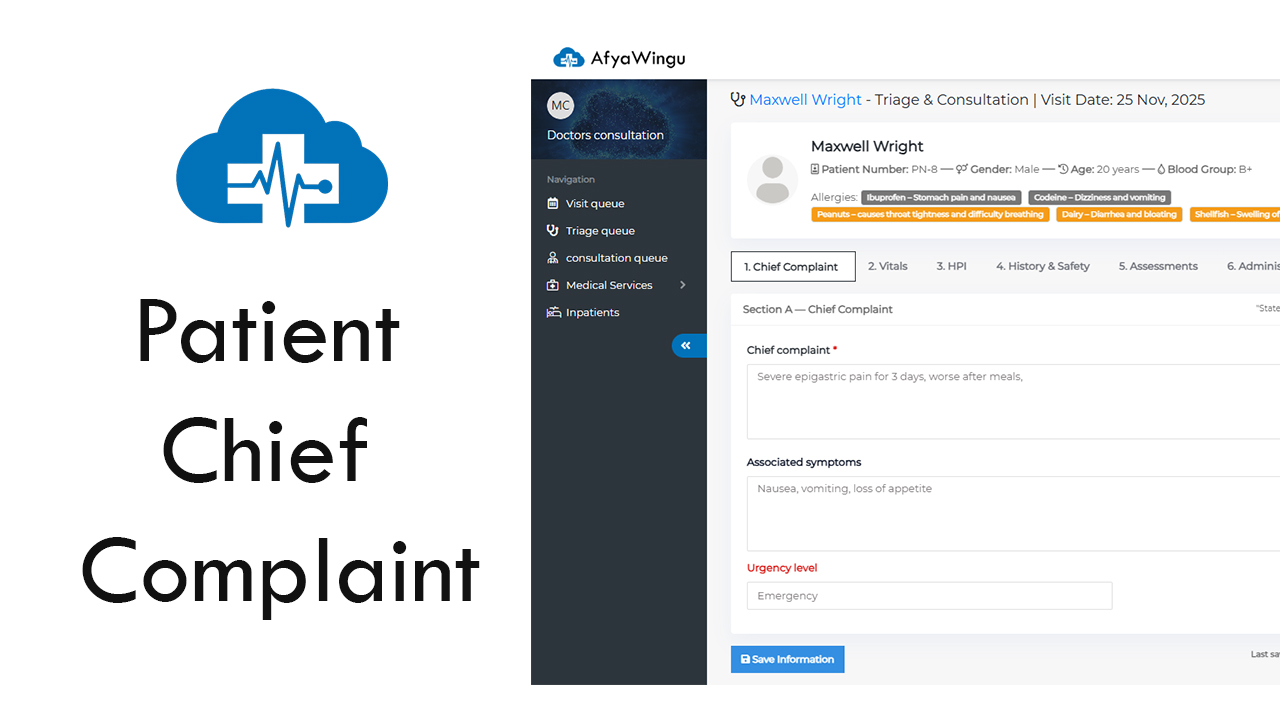
Welcome to the AfyaWingu Healthcare Management System — where smart documentation meets compassionate care.
In this guide, we’ll walk you through the “Triage & Consultation” form, your digital workspace for capturing everything you need to assess a patient’s condition quickly and accurately. From chief complaints to vital signs and clinical red flags, this form ensures no detail is missed—so your patient gets the right care at the right time.
Let’s explore how it works, using Maxwell Wright, a 20-year-old male visiting on November 25, 2025, as our example.
📍 Know Where You Are
At the top of the screen, you’ll see:
- Patient Name: Maxwell Wright
- Visit Date: November 25, 2025
- Breadcrumb Trail: Triage & Consultation > Patient > Attend
This keeps you oriented within AfyaWingu’s clinical workflow. On the left, the main navigation menu remains accessible—so you can jump back to the Triage Queue or other modules anytime.
👤 Patient Profile Snapshot
Just below the header, Maxwell’s key details are displayed for quick reference:
- Patient Number: PN-8
- Gender: Male
- Age: 20 years
- Blood Group: B+
- Allergies: None (If present, they’d be listed here in clear, bold text—e.g., “Penicillin”)
This immediate visibility reduces errors and supports faster clinical decisions.
🔁 Section Tabs: Your Clinical Workflow at a Glance
The form is organized into intuitive, tabbed sections:
- Chief Complaint ← (Currently open)
- Vitals
- HPI (History of Present Illness)
- History & Safety
- Assessments
- Administer Medications
Each tab builds a complete clinical picture. Let’s start with the most critical: Chief Complaint.
🔹 Section A: Chief Complaint – The Heart of Triage
This is where you capture why the patient came in today—in their own words. Precision here guides the entire care pathway.
1. Chief Complaint (Required)
Prompt: “State the primary reason for your visit in your own words.”
✅ Best practices for documentation:
- Include location (e.g., “epigastric,” “left ankle”)
- Note duration (“for 3 days”)
- Describe aggravating/alleviating factors (“worse after meals,” “better with rest”)
- Mention triggers (e.g., trauma, food, stress)
📌 Examples:
> “Severe epigastric pain for 3 days, worse after meals”
> “Fever and cough for 2 days, no improvement with paracetamol”
> “Left ankle swelling and pain after twisting it yesterday”
2. Associated Symptoms (Optional but highly recommended)
List additional symptoms, separated by commas:
> “Nausea, vomiting, loss of appetite”
> “Headache, dizziness, chills”
> “Shortness of breath, chest tightness, palpitations”
These clues help differentiate between similar conditions and support differential diagnosis.
⚠️ Urgency Level: Prioritize with Confidence
Below the symptom fields, use the Urgency Level dropdown to classify the case:
- Emergency: Life-threatening (e.g., chest pain, unconsciousness, severe bleeding)
- Urgent: Needs attention within 30–60 mins (e.g., high fever, severe trauma)
- Medium: Can wait 1–2 hours (e.g., mild infection, minor injury)
- Normal: Routine (e.g., check-up, prescription refill)
💡 Pro Tip: Reassess urgency if new symptoms emerge during triage—AfyaWingu makes it easy to update in real time.
📊 Quick Overview Panel (Right Side)
This sidebar gives you instant context:
- Allocated Doctor: Currently “Unknown” (updates automatically once assigned)
- Visit Date: Confirmed as November 25, 2025
- “View Past Visit History”: A blue button that opens the patient’s full clinical timeline—diagnoses, treatments, medications, and more.
Essential for continuity of care.
🚨 Live Interpretation: AI-Powered Clinical Alerts
One of AfyaWingu’s smartest features is the Live Interpretation panel. As you enter data, the system analyzes it in real time and flags potential risks.
In Maxwell’s case, it shows:
- > “Low SpO₂”
- > “Hypotension”
These alerts may be triggered by abnormal vitals or symptom combinations—helping you catch critical issues early, even during high-volume shifts.
💾 Save Frequently, Lose Nothing
At the bottom-left, click the “Save Information” button to preserve your work.
✅ Why it matters:
- Prevents data loss during interruptions
- Records Last saved: November 25, 2025 | Updated By: [User] for audit trails
- Enables seamless handoffs between nurses, clinicians, and doctors
Even if you’re not done, save early and often.
➡️ What’s Next?
Once Chief Complaint is complete, move through the remaining tabs:
- Vitals: Record temperature, pulse, SpO₂, BP, weight, height, BMI
- HPI: Expand on the timeline, severity, and progression of the illness
- History & Safety: Document past illnesses, medications, allergies, family history, and social factors
- Assessments: Enter your clinical impression and care plan
- Administer Medications: Log drugs given during triage or initial treatment
Together, these sections create a comprehensive, shareable patient record that empowers your entire care team.
Final Thoughts
The Triage & Consultation form in AfyaWingu isn’t just a digital sheet—it’s a clinical decision-support tool designed for real-world African healthcare settings. By standardizing documentation, highlighting risks, and connecting past to present, it helps you:
- Triage faster
- Document smarter
- Deliver safer, more effective care
Thank you for using AfyaWingu—where every data point brings you closer to better patient outcomes.